Import from Hevy or Strong
Export a CSV from Hevy or Strong, then open Settings › Import from Hevy or Strong in Strenova and choose the file. It’s free.
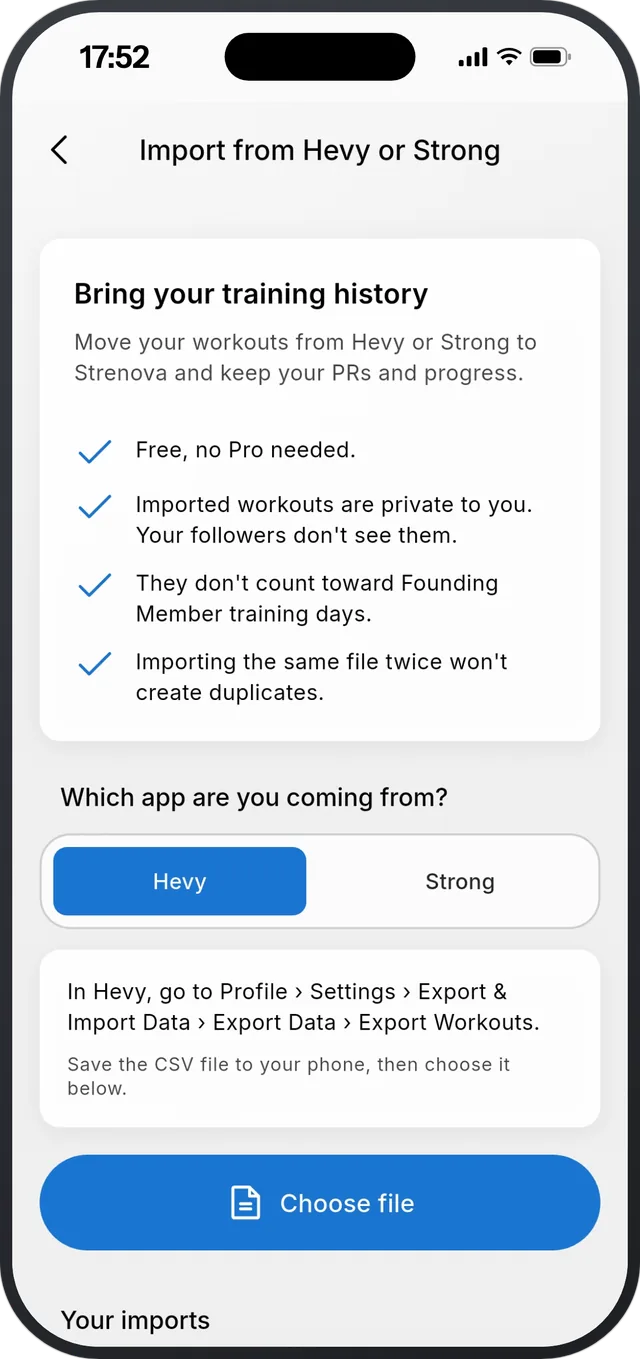
Step by step
- 1Export from your old app. Hevy: Profile › Settings › Export & Import Data › Export Data › Export Workouts. Strong: Settings › Export Strong Data. Save the CSV file to your phone.
- 2In Strenova, open Settings › Import from Hevy or Strong, choose the app you’re coming from, and choose the file.
- 3Check the summary: workouts, dates and sets. Strong files don’t say kg or lb, so you pick one.
- 4Look over the few exercises that need it. Keep the suggestion, pick another exercise, or add it as your own.
- 5The import runs in the background. When it’s done, your history, records and Trends include it.
Good to know
- Only completed workouts move. Routines, templates, supersets, rest times and body measurements don’t.
- Imported workouts are private. Your followers don’t see them, and they don’t count toward Founding Member days.
- Importing the same file twice won’t create duplicates.
- Changed your mind? Your imports are listed on the same screen, each with Undo. Undo removes only the workouts that import added.
- It’s a one-time import from a file, up to 20 MB, not a live sync.
About the featureFree
Import from Hevy or Strong
Bring your history. Keep your PRs.
Related
Still stuck?
Email us at hello@strenova.app. Tell us your phone and what you tried, and we’ll get back to you.