Strenova MCP
Connect Strenova to ChatGPT or Claude
Strenova’s MCP server lets your own AI assistant read your training and, if you allow it, update your plan. It takes about two minutes, on the web.
How to connect
You’ll need a Strenova account with Pro, and your own ChatGPT or Claude account. This is the address to paste:
https://strenova.app/mcp/fitnessIn Claude
- 1In Claude, open Settings, then Connectors.
- 2Choose Add custom connector. Name it Strenova and paste the address above.
- 3Click Connect, sign in to Strenova and choose read only or read and update.
- 4In a chat, turn Strenova on from the tools menu and ask your question.
In ChatGPT
- 1In ChatGPT, open Settings, then Apps and Connectors.
- 2Under Advanced settings, turn on Developer mode.
- 3Create a connector. Name it Strenova, paste the address above and choose OAuth.
- 4Sign in to Strenova, choose your access, then pick Strenova in a new chat.
You choose what it can do
When you sign in, Strenova asks which access to give. You can change your mind later by revoking it and connecting again.
Read only
It can look, never change. Good for questions about your progress.
- Your goals, preferences, units and gym equipment.
- Your workouts, exercises, sets, records and progress.
- Your programs, templates and training schedule.
- Recovery, plus imported health data and sleep, only when you ask for them.
Read and update
Everything above, and it can save what you agree on.
- Create and edit workout templates and programs.
- Log a workout or fix one you logged.
- Move a scheduled workout or start a program.
- Apply a progression suggestion, update your preferences and gym equipment.
Things to ask
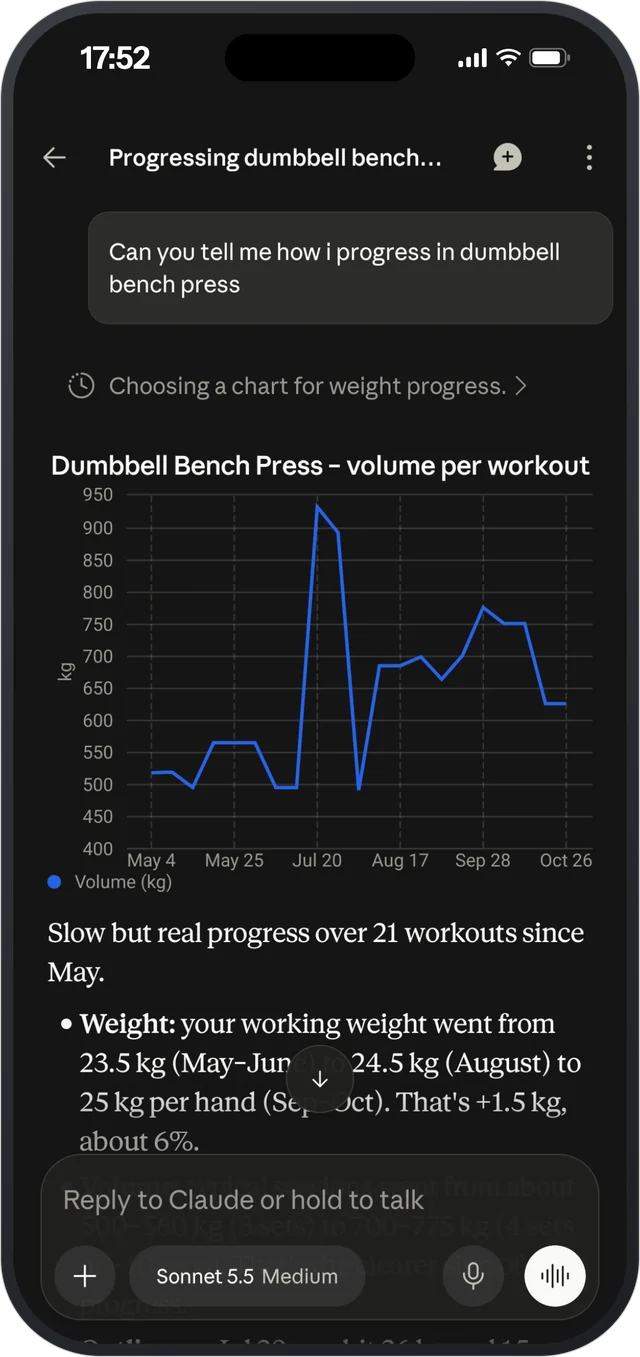
- “How has my bench press moved over the last six months?”
- “What should I train tomorrow, given my recovery?”
- “Build a template around the equipment in my gym.”
- “Move tomorrow’s workout to Friday.”
- “Which muscle groups did I train least this month?”
- “Apply this week’s progression suggestions.”
The last one needs read and update access.
Your data, your call
- Read access can never change anything. Updates need their own permission.
- Before a big change, like starting a program, the assistant is asked to show it to you first.
- Health data and sleep are only shared when you ask a question that needs them.
- Recovery is an estimate from your logged training, not medical advice.
- You can remove the connection any time, in ChatGPT or Claude.
Every tool
For the curious. Your assistant picks these on its own, you just ask.
Your training 11
- get_fitness_profile
- get_training_summary
- list_workouts
- get_workout_details
- get_exercise_progress
- search_exercises
- get_exercise_details
- get_training_consistency
- get_muscle_group_summary
- get_gyms
- get_fitness_options
Your plans 7
- list_workout_templates
- get_workout_template
- list_programs
- get_program
- get_active_program
- get_training_schedule
- get_progression_suggestion
Recovery and health 3
- get_recovery_summary
- get_health_summary
- get_sleep_sessions
Changes (read and update only) 11
- create_workout_template
- update_workout_template
- log_workout
- update_workout_log
- reschedule_workout
- apply_progression_suggestion
- create_program
- update_program
- activate_program
- update_fitness_preferences
- update_gym_equipment
Plus nutrition and check-in tools, for people who have a meal plan or check-ins set up.
Questions
Do I need Strenova Pro?
Yes. The Strenova account you connect needs an active Pro subscription, monthly or yearly.
Can it change my plan without asking?
Only with read and update access. Even then, it’s set up to show you a big change, like starting a program, before it makes it. Choose read only and it can only look.
What happens if my Pro ends?
The connection pauses. It comes back on its own when Pro is active again.
How do I disconnect?
Remove Strenova from your connectors in ChatGPT or Claude. To switch between read only and read and update, remove it and connect again.
Which AI apps work?
ChatGPT and Claude. The menu names in both change from time to time, so the steps above may look a little different.
Is my data used to train AI?
Strenova sends only what the assistant asks for, when you ask it something. What happens to your chats after that follows your ChatGPT or Claude settings.
Why connect it at all? See the ChatGPT and Claude feature
Progressive overload, made easy.
Free on iPhone and Android.