Your ChatGPT or Claude, reading your real training
“I copy my workouts into ChatGPT by hand.”
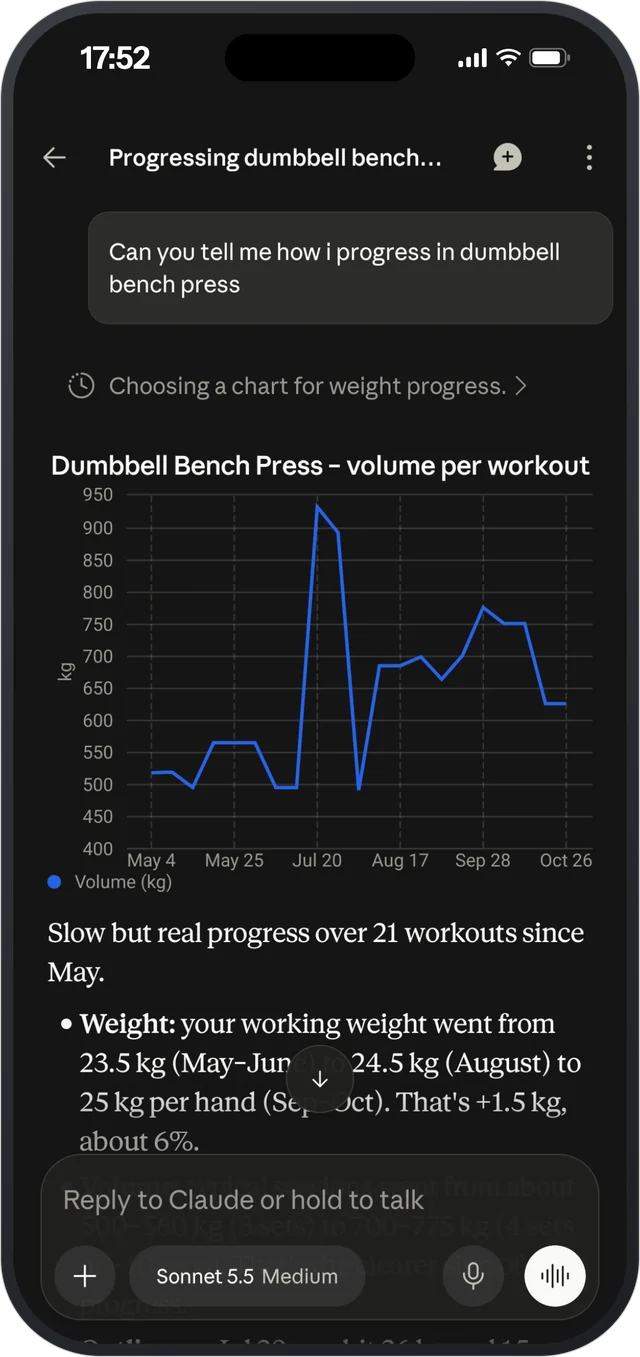
Connect your own ChatGPT or Claude account to Strenova. It reads the workouts and records you’ve logged, so it answers from your real numbers, not what you remember to paste in. If you allow it, it can change your plan. Pro, optional.


How it works
- 1
Add Strenova to your assistant
Add Strenova as a connector in ChatGPT or Claude and sign in with your Strenova account.
- 2
Choose what it can do
Read only, or allow changes. You can remove the connection at any time.
- 3
Ask about your training
“How is my bench going?” “What should I train tomorrow?” It answers from your logs, recovery and sleep. With changes allowed, it can update your program or templates.
What it can see
- Your workouts, exercises, records and progress.
- Your programs, templates and schedule.
- Recovery, and the sleep and health data you imported.
- With changes allowed: update your program and templates, reschedule a workout, or apply a progression suggestion.
What it doesn’t do
- It uses your own ChatGPT or Claude account. Don’t use either? Skip this, the rest of Strenova works without it.
- You connect it on the web, not in the phone app.
Questions
Do I need a second AI subscription?
No. You use the ChatGPT or Claude account you already have. Strenova Pro adds the connection.
Can it change my plan without asking?
Only if you allow changes when you connect. Choose read only and it can only look.
How do I disconnect?
Remove the connection from your Strenova account, or from ChatGPT or Claude.
Progressive overload, made easy.
Free on iPhone and Android.