Bring your history. Keep your PRs.
“I’d lose years of workouts if I switched.”
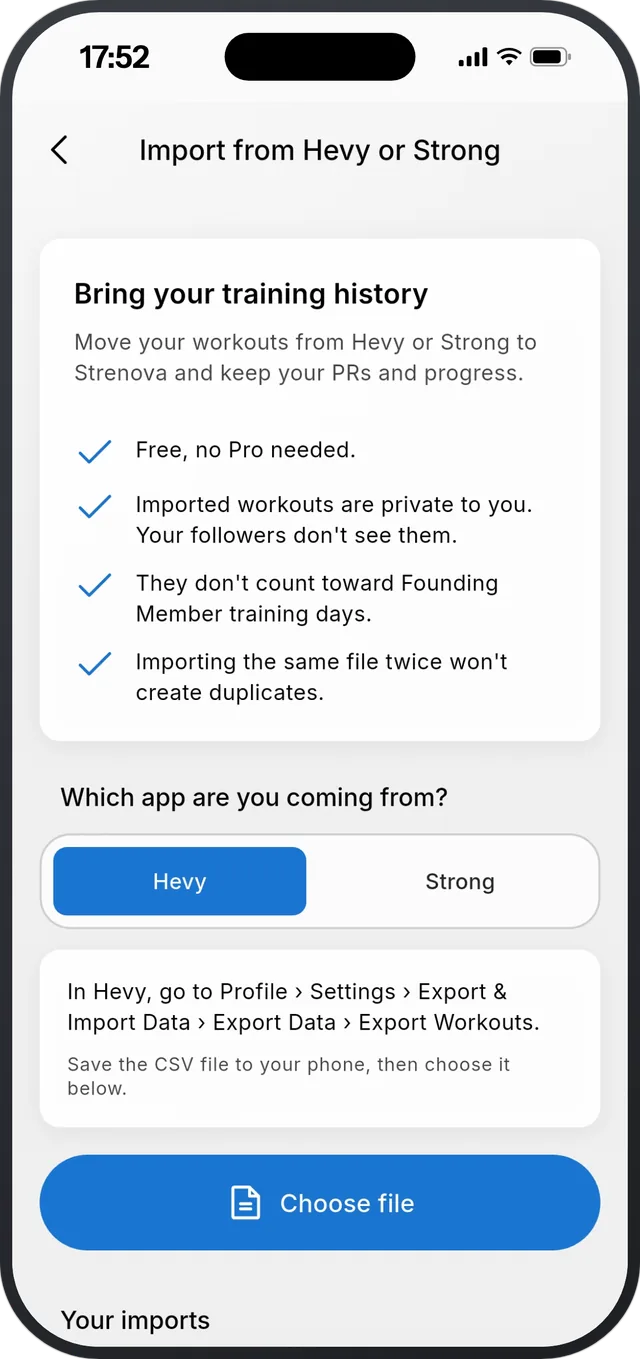
Strenova imports your workout history from Hevy and Strong. Your past workouts, records and trends come with you, so you don’t start from zero. Free, in the app or on the web.


How it works
- 1
Export from your old app
In Hevy: Profile, Settings, Export & Import Data, Export Data, Export Workouts. In Strong: Settings, Export Strong Data. You get a CSV file.
- 2
Pick the file in Strenova
Settings, Import from Hevy or Strong. Strenova shows how many workouts, the date range, and any duplicates it will skip. Strong files don’t say kg or lb, so you choose.
- 3
Check a few exercises, and you’re done
Most exercise names match on their own. For the few that don’t, keep the suggestion, pick another exercise, or add it as your own.
What comes over
- Every completed workout, with sets, weights and reps.
- Your records, trends, calendar, monthly reports and progression suggestions pick them up.
- Weights are converted to your unit.
- Imported workouts stay private: they don’t show in your followers’ feed.
- Undo an import at any time. It removes only the workouts that import added.
What it doesn’t do
- Only completed workouts come over. Routines, templates, supersets, rest times and body measurements don’t, so you set your routines up once.
- It’s a one-time file import, not a live sync.
- Other apps aren’t supported yet.
Questions
Is importing free?
Yes.
Will my PRs come over?
Yes. Strenova works out your records from the imported workouts, and they show in your records and trends.
What if I import the same file twice?
Workouts that start in the same minute are skipped, so you won’t get doubles.
How big can the file be?
Up to 20 MB.
Progressive overload, made easy.
Free on iPhone and Android.